
You want a clear answer fast. HubSpot is an AI-powered customer platform. It brings marketing, sales, service, content, commerce, and data together. It helps teams track customers, automate work, and grow revenue. Everything runs from one Smart CRM.
What exactly is HubSpot used for?
HubSpot is used to manage the full customer journey. It tracks every email, call, chat, page visit, and deal. It stores this activity in one clean profile for each person. Then it uses AI to help your team act faster.
Here is what teams use it for:
- Marketing: Create campaigns, build segments, send emails, and grow traffic.
- Sales: Track deals, do outreach, create quotes, and close faster.
- Service: Manage tickets, answer chats, and power a help center.
- Content: Build websites, blogs, and landing pages with your brand voice.
- Commerce: Send invoices, take payments, and manage subscriptions.
- Data: Clean, sync, and connect data across tools and apps.
The platform has AI agents to help with daily work. These agents can draft content, qualify leads, answer support, and build quotes. HubSpot also has reports that tie segments to revenue. So you can see what drives money, not just clicks.
How HubSpot works in plain words
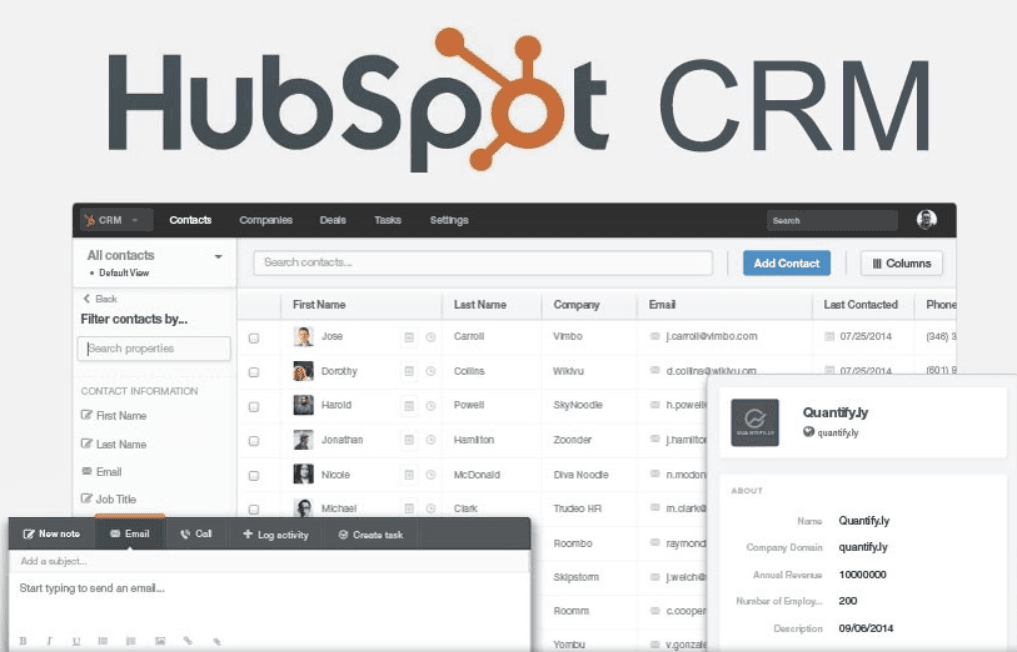
HubSpot uses a Smart CRM at the center. It makes a unified profile for each contact or company. Profiles auto-enrich from emails, calls, meetings, forms, and your website. They also enrich from outside sources and integrations.
Your data shows up in easy views. You can see tables, charts, boards, and timelines. You also get Smart Insights. These show risks, trends, and next steps.
You can create Segments to group people by traits and actions. Then you can run Journeys that send the right message at the right time. You can also assign work in Workspaces for sales, service, and success teams.
It all connects to reports. You can track traffic, leads, deals, tickets, and payments. You can see which steps lead to revenue.
The main Hubs and what they do
HubSpot has “Hubs.” Each hub solves a key job. You can start free and add hubs as you grow.
- Marketing Hub: Build campaigns, emails, ads, and landing pages. Use AI to write content and SEO. Create lookalike lists and dynamic segments. Run Journey Automation for nurturing. Optimize for search and answer engines.
- Sales Hub: Track deals, tasks, and outreach. Use Prospecting Agent to research and personalize. Use sequences and meeting links. Forecast with AI. Keep deals moving with playbooks.
- Service Hub: Run a shared inbox and ticketing. Use Customer Agent to answer first. Build a knowledge base and customer portal. Set SLAs and track response times.
- Content Hub: Build your website and blog with drag-and-drop. Use AI to keep brand voice. Remix content into posts or scripts. Personalize pages with CRM data.
- Commerce Hub: Send quotes and AI-created proposals. Take payments and subscriptions. Track products and invoices. Connect payments to deals and reports.
- Data Hub (new name for Operations): Clean data with AI. Deduplicate records. Sync tools both ways. Build custom objects and data quality rules.
Quick hub overview
| Hub | What it’s for | AI highlights |
|---|---|---|
| Marketing | Campaigns, emails, ads, pages, SEO | Content Agent, Segments, lookalikes, Journeys |
| Sales | Deals, outreach, meetings, forecasts | Prospecting Agent, Deal Loss Agent, summaries |
| Service | Tickets, inbox, help center, SLAs | Customer Agent, Knowledge Base Agent |
| Content | Website, blog, brand voice, personalization | AI remix, brand tone, content planning |
| Commerce | Quotes, CPQ, invoices, payments | AI quotes, Closing Agent for buyer questions |
| Data | Sync, cleaning, rules, custom objects | AI data cleaning, mapping, quality alerts |
What’s new in 2026
2025 brings many fresh updates. Here are the biggest ones:
- Breeze AI Agents: Over 15 agents help across teams. Examples include Prospecting, Customer, Closing, Content, and Company Research. These agents draft, analyze, and answer with context.
- Smart CRM upgrades: Profiles now include auto-enriched intent and activity insights. You get more context with less clicking.
- Segments got smarter: Create AI-driven audiences that tie directly to revenue. Reports show which segments pay off.
- Data Hub replaced Operations Hub. It focuses on AI data cleaning, connections, and quality.
- Commerce Hub CPQ: Create quotes with AI, faster and cleaner. Close deals without leaving CRM.
- Customer Agent handles over 50% of tickets automatically. Closure time drops by around 40%.
- Credits-based pricing for AI and automation. Buy extra credits when needed. Start with standalone CRM if you want.
- Marketplace growth: Over 77 new apps arrived in July 2025. Popular picks include Shopify and more.
These updates aim to support hybrid human-AI teams. HubSpot shipped 200+ updates in 2025. That shows speed and strong support.
The big reasons teams choose HubSpot
- One platform for your entire customer journey.
- Unified data means better targeting and smoother handoffs.
- AI help saves hours on research, writing, and support.
- Automation runs tasks 24/7 with fewer mistakes.
- Clear reports tie actions to revenue, not just clicks.
- Grows with you from startup to enterprise scale.
Real results: proof from case studies
Here are recent results from real companies. These show impact across service, sales, content, and revenue.
| Company | Key uses | Results | Testimonial |
|---|---|---|---|
| 4Racing | Service Hub with unified inbox and dashboards | Ticket resolution improved from 4.3 days to 17.6 hours. First response dropped from 16.5 to 9.7 hours. | “We now handle far more service requests faster.” – Belinda Armstrong |
| Real Success Network | Onboarding and helpdesk automation | Managed 1.5M contacts with smooth scaling and live dashboards. | Process-focused story showed easier growth. |
| iKhokha | Forms, Shopify automation, CMS tracking | Website sessions grew by over 500 percent. | Strong gains after migration. |
| Avison Young | CRM adoption across teams | Achieved a 90 percent CRM adoption rate. | Video highlights full CRM unification. |
| NCI | HubSpot Payments | Reached $700K in sales with payments connected to CRM. | Payments improved cash collection. |
| Wayflyer | Full platform for revenue ops | Scaled 900 percent to unicorn status. Raised $800M+. | Platform supported fast growth. |
| FINN | CRM for subscriptions | Grew to 20K customers and $160M ARR in four years. | Clear growth during scaling years. |
| Hüify | Sales Pro + CRM | Revenue grew 6X. Sales cycle dropped from nine months to four weeks. | “More trust and higher annual value.” |
| Aerotech | AI deal prioritization | Win rates increased by 66 percent. | Strong result from AI insights. |
These results match HubSpot’s 2025 focus. The trend is clear. Teams who unify data and use AI win faster.
What do teams actually do each day?
Here are common daily workflows in HubSpot:
- Marketing runs AI-written emails and ads to Segmented audiences.
- Sales gets Prospecting Agent notes before outreach. Reps send sequences.
- Service uses Customer Agent to answer chats and triage tickets.
- Content teams draft a blog, then remix it into social posts.
- Finance sends quotes and takes payments right inside the CRM.
- Ops uses Data Hub to clean data and sync tools.
Every step writes back to the Smart CRM. Everyone sees the same truth.
How HubSpot personalizes every touch
Personal messages work. HubSpot makes that simple:
- Build Segments using traits, actions, and intent.
- Use personalization tokens in emails and pages.
- Adjust pages by CRM data, like industry or lifecycle stage.
- Trigger Journeys after clicks, views, or form fills.
- Score leads with AI and assign them to the right rep.
This is how you send the right message at the right time.
Reports that connect to revenue
Leaders care about revenue, not just opens or clicks. HubSpot gives you:
- Attribution reports for channels and campaigns.
- Pipeline and forecast dashboards for sales managers.
- Ticket and SLA dashboards for service leaders.
- Revenue and payments tracking for finance teams.
- Segment-to-revenue reporting that shows audience value.
You can filter by team, product, region, or date. You can see what works and what to fix.
Who should use HubSpot?
HubSpot fits many groups:
- Startups that want free tools and fast setup.
- Small businesses that need one tool, not ten tools.
- Mid-market firms that want scale without heavy code.
- Enterprises that need clean data and team hierarchies.
- B2B and B2C teams with long or short cycles.
- Ecommerce brands that need payments and subscriptions.
- Services and SaaS teams that live on renewals.
It also helps hybrid and remote teams stay in sync.
Pricing and plans in simple terms
Here is the simple version:
- The core CRM is free. You can start today.
- Add Hubs for more features as you grow.
- Hubs have Starter, Professional, and Enterprise tiers.
- AI and automations use a credits model. Buy more when needed.
- You can choose a standalone CRM if that fits best.
- The App Marketplace has thousands of integrations. Over 77 new apps landed in July 2025 alone.
You can mix hubs based on your needs. You can also upgrade later.
Integrations that keep data flowing
HubSpot connects with your tools. Popular picks include:
- Gmail and Outlook for email sync.
- Shopify and Stripe for sales and payments.
- Slack, Zoom, and Calendars for meetings.
- Snowflake and data tools for enterprise needs.
- Webhooks and custom integrations for special workflows.
With Data Hub, sync is faster and cleaner. You can also set data rules.
Deep dive: AI agents and what they do
AI agents save time and reduce errors. Here are key agents:
- Prospecting Agent: Finds insights on leads. Drafts strong outreach notes.
- Deal Loss Agent: Studies lost deals. Suggests fixes and plays.
- Closing Agent: Answers buyer questions 24/7. Helps close faster.
- Customer Agent: Resolves over 50% of tickets automatically.
- Knowledge Base Agent: Builds helpful articles from chats and tickets.
- Content Agent: Drafts blogs, emails, and scripts in your brand voice.
- Company Research Agent: Preps account notes and key triggers.
These agents use your CRM context. So answers and drafts feel on-brand and helpful.
What makes HubSpot different?
Three things stand out:
- One platform with one login and one record of truth.
- Easy UI that non-technical teams can learn quickly.
- AI all over the platform, not just one area.
Many tools claim this. The case studies and 2025 updates show the real gap.
Pros and limits you should know
Here is a balanced view.
Pros:
- Unified CRM reduces silos and messy handoffs.
- AI agents boost speed and quality across teams.
- Automation lets you scale without adding headcount.
- Great UX helps adoption and training.
- Reports connect segments and journeys to revenue.
Limits:
- Advanced AI and automations need paid tiers.
- Strong setups still need time and skill.
- Data quality needs steady care and rules.
- Big migrations may need partner help.
These are normal tradeoffs for any full platform.
Common use recipes you can copy
Try these simple plays.
- Lead gen to close: 1) Create a Segment with fit and intent. 2) Launch an email drip with AI drafts. 3) Auto-assign hot leads with lead scoring. 4) Reps use Prospecting Agent for outreach notes. 5) Send AI quotes, then collect payments in CRM.
- Support deflection and speed: 1) Turn on the Customer Agent in chat. 2) Route tickets by skill and priority. 3) Build a knowledge base with AI help. 4) Watch SLA and first response trends. 5) Improve macros based on Deal Loss style insights.
- Content at scale: 1) Draft a blog with Content Agent. 2) Remix it into social and email posts. 3) Personalize page blocks with CRM data. 4) Measure SEO and Answer Engine traffic lifts. 5) Double down on posts tied to revenue.
- Ecommerce and quotes: 1) Track products with Commerce Hub. 2) Create AI quotes with clear terms. 3) Send for e-signature and collect payment. 4) Trigger onboarding steps after payment. 5) Watch churn and upsell signals in CRM.
Security, scale, and control
Enterprise teams need control. HubSpot supports:
- Team hierarchies and permissions by role and region.
- Custom objects for complex data shapes.
- Audit logs and approvals for safe changes.
- Sandboxes for testing workflows.
- Multi-account needs with shared data rules.
This helps large groups roll out with trust.
Practical tips for a smooth rollout
- Start with the core CRM and one hub.
- Define a single source of truth for each field.
- Keep naming rules for lists, segments, and workflows.
- Build dashboards for each leader early.
- Train with Workspaces and playbooks per team.
- Review your data health every month.
These steps avoid mess and speed up wins.
Short FAQ
- Is HubSpot free?
Yes. The core CRM is free forever. - Does it work with my tools?
Likely yes. The Marketplace has thousands of apps. - What about 2025 AI updates?
You get 15+ agents, Data Hub, Smart CRM, and more. - Can I start small?
Yes. Use standalone CRM and add hubs later. - Does AI replace people?
No. It boosts your team with faster, smarter help.
Final checklist before you choose
Ask these questions:
- Do we need one place for all customer data?
- Do we want AI to speed research, writing, and support?
- Do we need to tie segments to revenue clearly?
- Will simple UX help us adopt faster?
- Do we want to scale without adding many tools?
If you answered “yes,” HubSpot is a strong fit.
Conclusion
Here is your next move: 1) Sign up for the free CRM today.
2) Turn on one hub and one AI agent.
3) Build one Segment-to-Revenue dashboard and review weekly. This is some basic, sample markdown.