Introduction: Why Thinkific Matters for Course Creators
If you’re looking to create and sell online courses, you’ve probably come across Thinkific during your research. As someone who has worked with multiple course platforms over the years, I can tell you that choosing the right one is critical to your success as an online educator.
Thinkific has emerged as one of the leading platforms in the online course space, powering more than 50,000 course creators across 190 countries. But is it the right choice for your specific needs?
In this comprehensive Thinkific review, I’ll walk you through everything you need to know about the platform—from core features and pricing to genuine pros and cons based on real usage. By the end, you’ll have a clear understanding of whether Thinkific is the right platform for your course business.
What Is Thinkific? A Quick Overview
Thinkific is a comprehensive online course platform that allows entrepreneurs, educators, and businesses to create, market, and sell digital courses without needing technical skills. Unlike marketplace platforms like Udemy, Thinkific gives you complete control of your courses, branding, pricing, and student data.
Founded in 2012 by Greg Smith, Thinkific has grown into a robust platform that emphasizes customization, student experience, and business growth tools. It’s designed to be an all-in-one solution where you can:
- Build multimedia courses with videos, quizzes, and assignments
- Create a branded website for your online school
- Process payments and manage subscriptions
- Engage students with community features
- Track progress and results with detailed analytics
What sets Thinkific apart is its focus on helping creators build sustainable businesses around their expertise, rather than just hosting individual courses.
Key Features of Thinkific in 2026
Course Creation and Delivery
Thinkific’s course builder is intuitive yet powerful. You can structure your course into chapters and lessons, with multiple content types including:
- Video lessons with HD playback
- Text and image-based lessons
- Downloadable resources (PDFs, worksheets, etc.)
- Audio files
- Presentations and slideshows
- Surveys and quizzes
The drag-and-drop builder makes organizing your curriculum simple, even for non-technical users. You can easily rearrange lessons, duplicate content, and create a logical flow for your students.
One standout feature is the ability to drip-feed content over time, perfect for cohort-based courses or preventing information overwhelm. You can also set prerequisite lessons to ensure students follow your intended learning path.
Website Building Capabilities
Thinkific includes a surprisingly robust site builder that lets you create a professional-looking course website without needing a separate platform. Recent updates have made the site builder even more flexible with:
- Customizable themes and templates
- Mobile-responsive design
- Custom domain support
- SEO settings and optimizations
- Blog functionality
- Landing page templates for marketing
While not as powerful as dedicated website builders like WordPress, Thinkific’s site capabilities are more than sufficient for most course creators, especially those who want simplicity and integration with their learning environment.
Marketing and Sales Tools
Thinkific has significantly expanded its marketing features in recent updates. You can now:
- Create coupons and promotional offers
- Bundle courses together
- Offer monthly subscriptions or one-time payments
- Use upsells and order bumps to increase cart value
- Set up affiliate programs for your courses
- Create custom checkout pages
- Integrate with email marketing tools like ConvertKit and Mailchimp
The platform also supports multiple currencies and languages, making it suitable for global course businesses.
Student Engagement and Community
Keeping students engaged is critical for course completion and satisfaction. Thinkific offers:
- Community features to foster student interaction
- Progress tracking for students
- Completion certificates
- Gamification elements like achievement badges
- Direct messaging between instructors and students
- Discussion forums within courses
The Communities feature is particularly valuable as it creates a dedicated space for your students to connect, reducing the need for external community platforms in many cases.
Analytics and Reporting
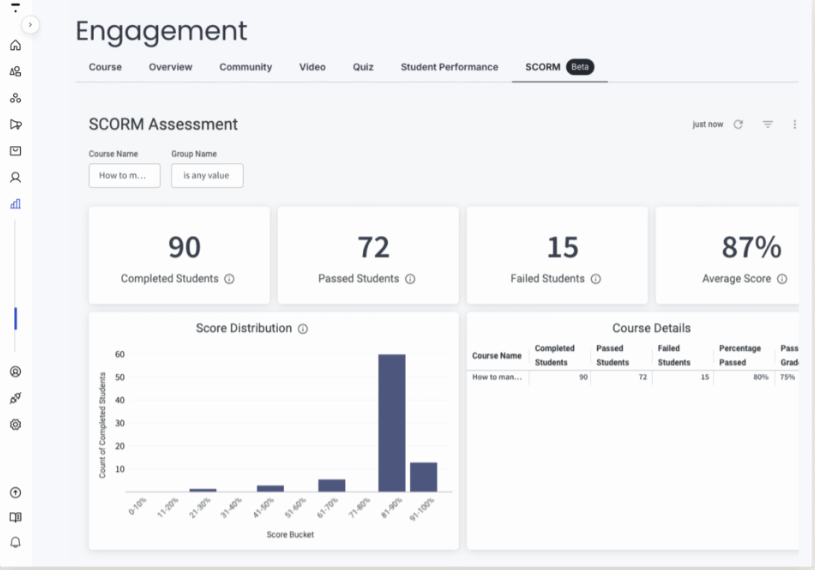
Thinkific provides robust analytics to help you understand your business performance and student engagement:
- Revenue and sales tracking
- Student progress and completion rates
- Course engagement metrics
- Quiz and assessment results
- Affiliate performance data
These insights help you identify what’s working, where students might be getting stuck, and how to improve your course offerings over time.
Thinkific Pricing Plans Explained
Thinkific offers a tiered pricing structure designed to accommodate different stages of your course business. Here’s a breakdown of the current 2025 pricing plans:
Free Plan
Thinkific is one of the few platforms that offers a genuinely useful free plan with:
- Up to 3 courses
- Unlimited students
- Basic quizzes and surveys
- Core integrations
- No transaction fees (you still pay payment processor fees)
The free plan is excellent for testing the platform or hosting a simple course, but it lacks advanced features.
Basic Plan ($49/month or $36/month billed annually)
The Basic plan adds:
- Unlimited courses with video lessons, quizzes, and student discussions
- 1 community with DMs and weekly digests
- 5 digital downloads
- (e.g. e-books, workbooks, templates)
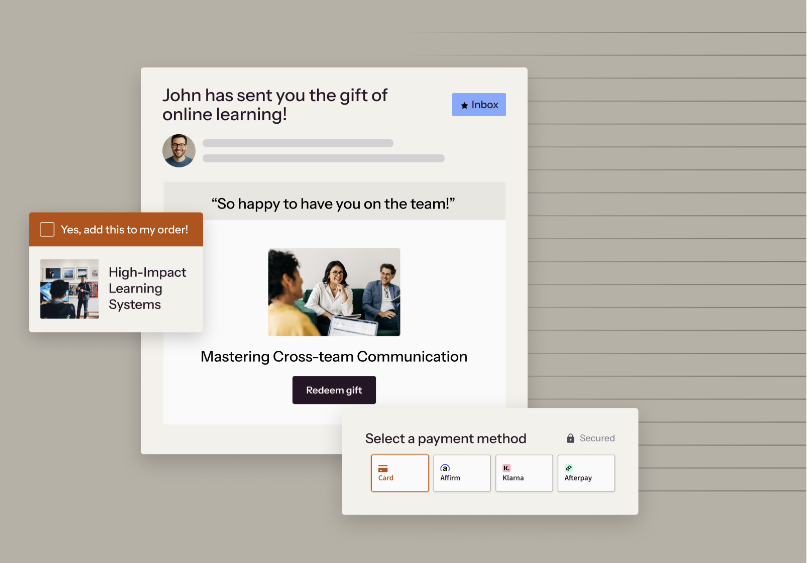
- Basic sales tools including order bumps, gifting, and coupons
- Abandon cart emails to recover lost sales
- Reporting and analytics for growth insights
- A custom domain for your brand
This is suitable for serious creators just starting their course business.
Grow Plan ($199/month or $149/month billed annually)
For scaling businesses, the Grow plan offers:
- 3 communities for audience segmentation
- White-labeling across pages, products, and emails
- Enhanced analytics with enrolment and engagement insights
- Invoicing to send, track, and manage customer payments
- Group orders for bulk purchases and seat assignments
- Third party integrations via API and webhooks
- Phone and priority chat support
All plans come with unlimited video hosting and bandwidth, which is a significant advantage compared to some competitors that charge based on storage or student numbers.
Get started with Thinkific today and choose the plan that best fits your course creation needs.
Pros and Cons of Using Thinkific
What I Love About Thinkific
Ease of Use and Clean Interface
Thinkific’s interface is intuitive and well-designed. Even if you’re not tech-savvy, you can create professional-looking courses with minimal effort. The admin dashboard is logically organized, making it easy to find what you need.
No Transaction Fees
Unlike platforms like Teachable, Thinkific doesn’t charge transaction fees on any plan (you still pay standard payment processor fees). This can result in significant savings as your course sales grow.
Robust Free Plan
The free plan is genuinely useful for testing the waters or hosting simple courses, which is rare among course platforms of this caliber.
Course Player Experience
Students enjoy a clean, distraction-free learning environment that works well on mobile devices. The course player is responsive and professional-looking.
Stability and Uptime
In my experience, Thinkific has excellent uptime and rarely experiences technical issues, which is crucial when your business depends on your course platform.
Strong Focus on Education
The platform is clearly designed with educational principles in mind, not just as a content delivery system. Features like course compliance, prerequisites, and assessments reflect this educational focus.
Excellent Customer Support
Thinkific’s support team is knowledgeable and responsive. They offer live chat, email support, and an extensive knowledge base.
What Could Be Improved
Limited Marketing Automation
While Thinkific has improved its marketing features, it still lacks some of the advanced automation capabilities found in platforms like Kajabi. You’ll likely need to integrate with other tools for sophisticated marketing funnels.
Basic Email Functionality
The built-in email tools are somewhat limited. For serious email marketing, you’ll want to connect with a dedicated email service provider.
Learning Curve for Advanced Customization
While basic course creation is simple, getting the most out of Thinkific’s customization options can take time to master, especially if you want to use custom code.
Limited Payment Gateways
Thinkific primarily supports Stripe and PayPal. If you need other payment options, you may need workarounds.
Community Features Still Developing
While the Communities feature is valuable, it doesn’t yet match the depth of dedicated community platforms like Circle or Facebook Groups.
Who Should Use Thinkific?
Ideal For:
Independent Course Creators and Experts
If you’re an individual expert wanting to monetize your knowledge with full control over your brand and content, Thinkific is an excellent choice.
Small to Medium Businesses Offering Training
Companies that need to offer training products or customer education will find Thinkific’s business-friendly features valuable.
Education Organizations Transitioning Online
Traditional educational institutions moving courses online will appreciate Thinkific’s focus on pedagogical features and student experience.
Content Creators Building Knowledge Businesses
YouTubers, bloggers, and other content creators looking to diversify revenue streams with premium courses will find Thinkific integrates well with their existing platforms.
Less Suitable For:
Creators Seeking an All-in-One Marketing Platform
If you want comprehensive marketing automation, funnel building, and CRM in the same platform as your courses, Kajabi might be a better fit despite its higher cost.
Those Needing Extensive Community Features
If community is the central element of your offering (rather than courses), a dedicated community platform might serve you better.
Budget-Conscious Creators with Simple Needs
If you just need to sell a simple PDF or basic course, simpler platforms like Podia or even WordPress with LearnDash might be more cost-effective.
How Thinkific Compares to Alternatives
Thinkific vs. Teachable
Teachable is perhaps Thinkific’s closest competitor. The key differences include:
- Teachable charges transaction fees on their basic plan; Thinkific doesn’t
- Teachable has a slightly more streamlined course creation process
- Thinkific offers a more robust free plan
- Teachable has built-in EU VAT handling; Thinkific requires third-party integration
- Thinkific’s site builder is generally considered more flexible
Overall, both are excellent platforms, but Thinkific often edges out Teachable for those who prioritize customization and avoiding transaction fees.
Thinkific vs. Kajabi
Kajabi is a more comprehensive all-in-one platform with advanced marketing capabilities:
- Kajabi costs significantly more than Thinkific
- Kajabi includes advanced marketing automation, email, and pipeline tools
- Thinkific offers more course-specific features and flexibility
- Thinkific provides a free plan; Kajabi doesn’t
- Kajabi limits the number of products and contacts; Thinkific doesn’t
Kajabi is better for creators who want everything under one roof and are willing to pay a premium. Thinkific is better for those who prioritize course features over marketing tools or who prefer to integrate with specialized marketing platforms.
Thinkific vs. Podia
Podia is a simpler, more affordable alternative:
- Podia has a cleaner, simpler interface but fewer advanced features
- Thinkific offers more robust course structuring and assessment options
- Podia includes digital product sales and webinars in all plans
- Thinkific provides more customization options for your school site
- Podia has a lower price point for comparable plans
Podia is excellent for creators who want simplicity and value, while Thinkific better serves those who need more educational features and customization.
Getting Started with Thinkific: A Quick Guide
If you’re convinced Thinkific might be right for you, here’s how to get started:
- Sign up for a free account: Begin with the free plan to explore the platform without commitment. Create your Thinkific account here.
- Set up your school: Configure your basic settings, including your school name, URL, and basic branding.
- Plan your first course: Before building, outline your course structure, including chapters and lessons.
- Create your course content: Use the course builder to add your videos, text, quizzes, and other content.
- Set up your pricing: Decide whether your course will be free, one-time payment, subscription, or payment plan.
- Customize your site: Use the site builder to create your homepage, sales pages, and overall brand look.
- Preview and test: Experience your course as a student would to catch any issues.
- Launch and promote: Once everything looks good, publish your course and begin your marketing efforts.
The platform offers extensive documentation and tutorials to guide you through each step, and the free plan gives you time to get comfortable before committing to a paid plan.
Thinkific FAQs
Is Thinkific easy to use for beginners?
Yes, Thinkific is designed to be user-friendly even for those with minimal technical skills. The platform uses a visual editor and intuitive drag-and-drop interfaces. Most users can create their first course within a day of signing up.
Does Thinkific take a percentage of sales?
No, Thinkific doesn’t take any percentage of your sales on any plan. You pay only your monthly subscription fee and standard payment processor fees (typically 2.9% + $0.30 per transaction for Stripe or PayPal).
Can I migrate my existing courses to Thinkific?
Yes, Thinkific offers migration support for courses from other platforms. For larger course libraries, they provide migration services, though these may come at an additional cost for complex transfers.
Does Thinkific offer certificates for course completion?
Yes, certificates are available on the Pro plan and higher. You can create custom certificates with your branding that are automatically issued when students complete your courses.
Is Thinkific mobile-friendly?
Yes, both the course creation interface and the student learning environment are mobile-responsive. Students can access courses on any device, and course creators can manage most aspects of their school from mobile devices.
Can I offer coaching or live sessions through Thinkific?
Thinkific doesn’t have built-in video conferencing, but you can integrate with tools like Zoom or Calendly to schedule and manage live sessions. You can also embed live stream platforms within your courses.
What payment methods can my students use?
Thinkific primarily supports Stripe and PayPal for processing payments, which covers most major credit cards and payment methods worldwide. For additional options, you may need to use third-party integrations.
Does Thinkific offer customer support?
Yes, Thinkific provides email support for all paid plans, with response times typically within 24 hours. The Pro plan and above receive priority support. They also offer an extensive knowledge base, community forum, and training resources.
Final Verdict: Is Thinkific Worth It in 2026?
After thoroughly reviewing Thinkific’s features, pricing, and user experience, I believe it remains one of the best platforms for serious course creators in 2026.
Thinkific strikes an excellent balance between ease of use and powerful functionality. The platform prioritizes what matters most—creating engaging courses, delivering them in a professional environment, and giving you the tools to grow your knowledge business.
What impresses me most is how Thinkific continues to evolve without overcomplicating its core offering. Recent updates have addressed previous limitations while maintaining the platform’s user-friendly approach.
For most course creators, especially those focused on delivering high-quality educational experiences rather than complex marketing funnels, Thinkific provides the ideal combination of features, flexibility, and fair pricing.
Whether you’re just starting your first course or scaling a mature education business, Thinkific offers a solution that can grow with you. I recommend starting with the free plan to explore the platform, then upgrading as your needs evolve.
Remember that the best course platform is ultimately the one that lets you focus on creating great content and connecting with your students, rather than fighting with technology. In that regard, Thinkific excels by getting out of your way while providing the tools you need to succeed.
Advertiser Disclosure: We are reader supported. If you buy through links on this page, we may earn a small commission at no additional cost to you.