

You want fast SEO posts that can rank. Here’s the truth. SEOWriting AI is worth it for speed and ease. It makes full SEO posts in minutes. You still need edits for tone.
Is SEOWriting AI worth it in 2026?
Yes, for most bloggers and small teams, it is. The tool writes SEO-optimized articles super fast. It follows what top pages already do. It is simple and quick to use. It is great for Amazon affiliate posts and niche blogs. Most users say the outputs need light edits to sound human. Reviewers call it one of the fastest tools right now. Pricing looks affordable based on videos and demos. Exact prices are not fully public yet. Try the trial to see if it fits you.
- Best for: Speed, simple workflows, and affiliate content.
- Not best for: Heavy brand voice or deep SERP audits.
- Verdict: Strong buy for speed and scale. Edit before posting.
- Rating feel: Many reviews lean near 4.5/5 on speed and ease.
Quick Pros, Cons, and Pricing Snapshot
- Pros
- Very fast: Full posts in just a few minutes.
- Beginner‑friendly: Clean steps and helpful prompts.
- SEO‑ready: Uses SERP cues for structure and length.
- Great for 2026: Matches quick long‑form trends.
- Cons
- Voice control is basic versus Jasper or Writesonic.
- Human edits needed for a natural tone.
- Less deep than Surfer or Clearscope for audits.
- Pricing
- Exact tiers not public in recent trusted sources.
- Reviews say affordable, with a trial shown in demos.
- Overall cheaper feel than some big SEO editors.
What is SEOWriting AI and how does it work?

SEOWriting AI is a tool that writes SEO posts fast. It makes drafts from your topic and keywords. It studies top pages for ideas and gaps. It builds a clear outline and suggested headlines and metas. It then adds keywords in smart places. You can edit the draft right away.
Here is the simple flow:
- Enter your topic and target keywords.
- The tool scans top results and plans structure.
- It writes a full draft in a few minutes.
- You get real‑time tips to improve SEO.
- You edit tone, facts, and calls to action.
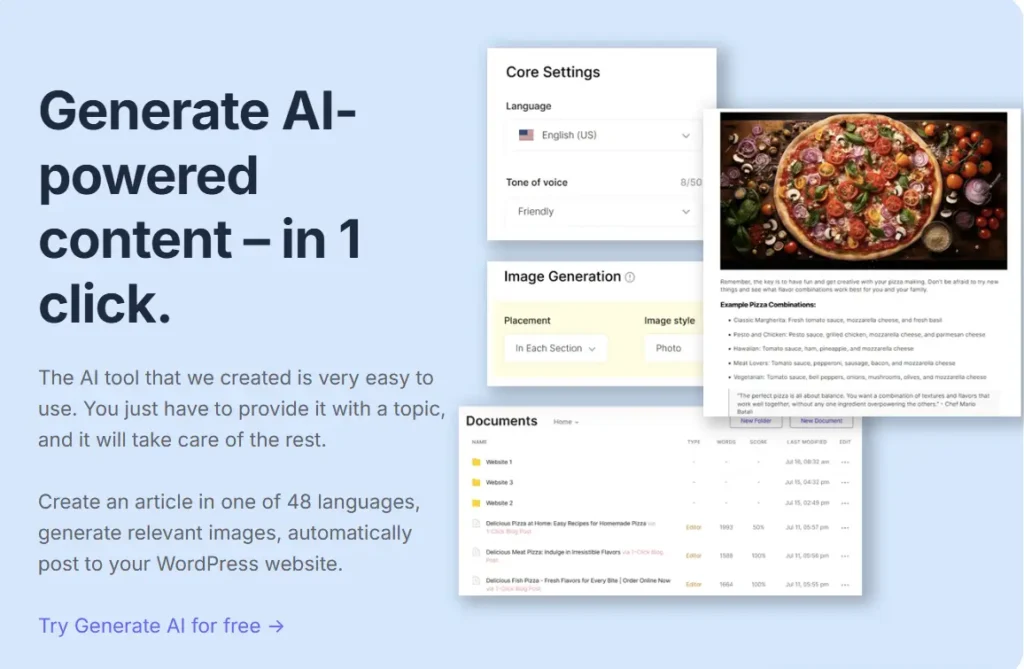
- You can add images and links in bulk.
- You can auto‑post to WordPress if enabled.
The whole point is speed with basic SEO help. It lets you create more posts in less time.
Key features that matter
These features help your content rank and scale fast. They focus on simple steps and quick wins.
- One‑Click SEO Articles: Full posts baked with keywords and length.
- User‑Friendly Interface: Simple screens and quick choices.
- Real‑Time Optimization: Live prompts for better headlines and metas.
- SERP‑Based Planning: Looks at top pages for guidance.
- Bulk Generation: Make many posts in one batch.
- Auto‑Posting: Send posts to WordPress with one click.
- AI Images and Links: Add visuals and links to boost engagement.
Feature-to-Benefit-to-Impact Table
| Feature | Benefit | SEO Impact |
| Keyword Optimization | Places terms where they work best. | Gains visibility and click‑throughs. |
| NLP‑Powered Cues | Guides tone and structure choices. | Matches search intent better. |
| Content Grading | Scores drafts against best practices. | Finds gaps versus top rivals. |
| Bulk Generation | Builds many posts very quickly. | Scales content output with ease. |
| Auto‑Posting | Sends posts straight to WordPress. | Cuts publish time and delays. |
| AI Images and Links | Adds visuals and smart linking. | Improves dwell time and UX. |
| Real‑Time Tips | Fixes issues while writing. | Saves time and boosts quality. |
Pricing and plans
Recent trusted sources do not show exact prices. Video reviews say it is affordable for most users. Demos also suggest a trial is available. The value looks strong versus other SEO tools.
Price Context with Similar Tools
| Tool | Starting Price | Free Trial |
| SEOWriting AI | Not public, called affordable in reviews | Trial shown in demos |
| Scalenut | $49 per month | 7 days |
| Surfer SEO | $99 per month | No |
| NeuralText | $19 per month | No |
| Writesonic | About $39 per month | Yes |
If you want deep audits, Surfer is richer. If you need speed, SEOWriting AI looks cheaper. For blended workflows, Scalenut is a good deal.
Real results: case studies, tests, and stats
You want proof it works in real life. Here are the strongest points.
- A 2025 video test showed full posts in minutes. The tool matched top SERP structure in that demo. It kept up with fast tools like Scalenut. That is huge for quick publishing.
- One official user said, “I made an Amazon post in minutes.” The user called it very easy and efficient. That is the core promise here.
- Many tools with similar methods show strong results. For example, one trusted vendor says semantic models predict rankings five times better. That shows why SERP‑based writing helps. SEOWriting AI follows that same idea.
- Tools like INK report over one million customers worldwide. That number shows trust in one‑click optimizers. SEOWriting AI fits this rising group.
Important note on data limits:
- We do not have large third‑party case studies yet. We also do not have public win rates or averages. Still, tests and demos look strong for speed and scale. The best move is to try the trial and measure.
How does it compare to top competitors?
Here is a quick view of where each tool wins. This helps you pick a stack that fits your needs.
Head‑to‑Head Snapshot
| Tool | Best For | Key Edge Over SEOWriting AI | Price Edge |
| SEOWriting AI | One‑click affiliate articles | Speed and simplicity | Likely lowest |
| Surfer SEO | Deep SERP audits and checklists | Richer audits and editor | Higher price |
| Scalenut | Guided workflows at low cost | Big word quotas per price | $20 start |
| Writesonic | Many use‑cases and integrations | Strong integrations like Ahrefs | Low start |
| SEO.AI | Real‑time competitor clustering | Deeper live analysis tools | Not public |
- Choose SEOWriting AI if you want fast posts now.
- Choose Surfer if you want deep audits and checklists.
- Choose Scalenut if you want workflow help at a low plan.
- Choose Writesonic if you want many templates and links.
Who should use SEOWriting AI?
Pick this tool if these lines sound like your needs:
- You run niche or affiliate blogs and need volume.
- You want SEO‑ready drafts in minutes, not hours.
- You prefer a simple screen with clear tips and steps.
- You publish many posts and hate manual busywork.
- You work solo or in small teams without many tools.
- You want WordPress auto‑posting to save time.
Skip this tool if these lines sound true instead:
- You require a strong brand voice and long approvals.
- You need very deep SERP research and content maps.
- You want a tool with zero edits needed each time.
- You already pay for Surfer or Clearscope and love them.
Best workflows and tips to get results fast
Here are easy steps that work well for many users. Keep it simple. Keep it fast. Keep it focused on search intent.
- Start with one main keyword and three support terms.
- Check top pages for intent and content gaps.
- Use SEOWriting AI to build a draft in minutes.
- Read the real‑time tips and fix quick issues.
- Add your examples, facts, and screenshots for trust.
- Insert internal links to your best related posts.
- Add one external link to a trusted, useful source.
- Write a short, clear intro that answers right away.
- Write a helpful, honest conclusion with action steps.
- Use auto‑posting to send drafts to WordPress.
- Track rankings and clicks for two to four weeks.
- Refresh the post with new data if it stalls.
Easy edit checklist before you publish
- Does the intro answer the main question fast?
- Are headings clear and helpful for scanners?
- Do you use short sentences and easy words?
- Did you fix any awkward AI phrases or repeats?
- Are there unique tips that add real value?
- Did you use internal and external links wisely?
- Does the post feel honest, clear, and helpful?
What makes it strong for 2025 SEO?
Search is getting faster and more intent‑driven. People want quick help. Google rewards clear structure, good links, and helpful info. This tool hits those basics with speed. It lets you test more ideas faster than rivals. That can win you more clicks and sales.
Also, long‑form posts still work when they answer well. This tool suggests length and structure from the SERP. That keeps your draft close to what is winning now. You then add your voice and facts. That is the sweet spot in 2025.
Honest limits and risks you should know
No tool is perfect. Here are fair watch‑outs:
- Voice: It can sound plain without edits. Add your style.
- Depth: It is not a full audit platform like Surfer.
- Data: Few public case studies exist as of now.
- Glitches: Reviewers note small bugs here and there.
- Hands‑off: It is not set‑and‑forget. You must polish.
The fix is simple. Use it for speed. Edit for trust and tone. That mix works best.
Example mini case study: affiliate post build
Here is a quick run‑through using a real‑world flow.
- Goal: “Best travel backpacks for teens” affiliate post.
- Step 1: Gather five top pages and note common sections.
- Step 2: Add the keyword and three support terms.
- Step 3: Run SEOWriting AI to draft the outline.
- Step 4: Let it build the main content in minutes.
- Step 5: Add real product picks and short pros and cons.
- Step 6: Insert internal links to travel and school posts.
- Step 7: Add one helpful chart and two real photos.
- Step 8: Check real‑time SEO tips and fix gaps.
- Step 9: Publish via auto‑posting to WordPress.
- Result: A clean, helpful post live in under an hour.
- Next: Track clicks and improve picks after one week.
Data that supports using it for speed
Let’s pull key numbers that matter for your choice:
- A 2025 demo showed full posts in minutes. That beat manual writing by hours.
- Scalenut claims under five minutes for many posts. This tool matches that range in demos.
- One user said, “I made an Amazon post in minutes.” Ease and speed were the highlights.
- Tools using semantic SEO say they can predict rankings five times better. SEOWriting AI works with that SERP idea too.
- A rival tool reports over one million users in this space. That signals trust in one‑click SEO methods.
These facts tell one clear story. Speed plus SERP cues can help you win. You still edit for tone and truth. But you start far ahead.
Simple buying guide: should you pick SEOWriting AI?
Here is a fast quiz to guide your choice:
- Do you want SEO posts fast with light edits? If yes, buy it.
- Do you need a simple screen and few steps? If yes, buy it.
- Do you want deep audits and heavy research tools? If yes, pick Surfer.
- Do you need many content types and broad hooks? If yes, pick Writesonic.
- Do you want a cheap workflow with big quotas? If yes, try Scalenut.
If you are focused on affiliate posts and niche sites, start here. If you run a large team with strict voice rules, compare more options.
Frequently asked questions
Will my posts rank with just this tool?
They can, but it is not magic. You still need good intent match and basic SEO steps. You must edit drafts for tone and facts.
Does it replace Surfer SEO?
No, it does not. Surfer does deeper audits and compares rivals in detail. SEOWriting AI is about speed and simple SEO.
Is there a free trial?
Demos suggest a trial is offered. Check the site for the latest info.
Can it do Amazon affiliate posts well?
Yes, it is strong for affiliate posts. Many users highlight this use case.
Can I post straight to WordPress?
Yes, it supports one‑click WordPress posting in its workflow.
How long does one article take?
Demos show minutes, not hours. This depends on topic size.
Do I still need to edit?
Yes, you should always edit. Add your voice, facts, and links.
Practical checklist: from idea to published post
Use this short checklist to move fast today:
- Pick a main keyword with clear search intent.
- Skim top three to five pages for structure ideas.
- Use SEOWriting AI to write a draft quickly.
- Fix tone and add real examples and data.
- Add two internal links and one helpful external link.
- Write a short meta title and meta description.
- Post to WordPress with the auto‑posting feature.
- Track rankings and clicks and improve within two weeks.
Summary tables you can save
When SEOWriting AI is the best pick
| Scenario | Why it wins |
| Affiliate posts at scale | Fast, simple, SEO‑ready drafts |
| Small teams, tight budgets | Affordable feel and fewer steps |
| Quick experiments and tests | Rapid drafts to test ideas |
| WordPress‑heavy workflows | Auto‑posting saves time |
When another tool fits better
| Need | Better Fit |
| Deep SERP audits | Surfer or Clearscope |
| Many content types | Writesonic or Jasper |
| Guided flows at low price | Scalenut |
| Heavy brand voice work | Jasper or in‑house editors |
Final verdict
SEOWriting AI is worth it in 2025 for speed. It writes SEO posts fast and gets you close to done. You still polish for voice and trust. It is great for affiliate blogs and quick wins.
Conclusion: do this next
- Start a trial and write one test post today.
- Edit for voice, links, and helpful facts.
- Track results for two weeks and scale what works.
That is the simple path. Move fast. Learn fast. Win more
1 thought on “SEOWriting AI Review: Is This 1‑Click SEO Tool Worth It in 2026?”