
Looking for the best online course platforms for artists? This guide provides quick answers, data, and clear picks to match your art and goals today.
The Best Online Course Platforms for Artists (Quick Answer)
- If you want to sell your own art classes:
- Teachable — Best overall for easy setup and clean checkout.
- Thinkific — Best for structure and simple communities and bundles.
- LearnWorlds — Best for interactive video and advanced branding.
- Bonus: Kajabi — Best all‑in‑one if you want email + funnels.
- If you want to learn from creative marketplaces:
- Skillshare — Best for creative variety and quick, project classes.
- Domestika — Best for beautiful, step‑by‑step, one‑off courses.
- Schoolism — Best for serious, pro‑level digital art training.
- CreativeLive — Best for workshops and creative business skills.
- Udemy — Best for cheap, targeted, one‑off skills.
- If you want art history and theory:
- Coursera + MoMA — Best for university‑style courses and certificates.
Short answer to “which is best?”
- No audience yet? Start on a marketplace (Skillshare, Domestika).
- Have fans already? Build your own school (Teachable, Thinkific, LearnWorlds).
- Want a full business suite? Use Kajabi.
How to Choose (Fast Artist Buying Guide)
Pick by these five questions:
- Audience vs. control
- Need built‑in traffic? Choose a marketplace.
- Want branding, pricing, and emails? Choose a course host.
- Income model
- Marketplaces pay royalties or per‑course sales.
- Hosts let you sell one‑time, subscriptions, bundles, or memberships.
- Ease of use
- Want quick and simple? Teachable and Thinkific are easy.
- Want advanced tools and polish? LearnWorlds shines.
- Artist features
- Support for high‑res video, downloads, brushes, project galleries, quizzes, communities, live sessions.
- Growth and scale
- Need coupons, affiliates, upsells, email, and analytics?
- Want to sell prints, brushes, or coaching too?
Tip: Start simple. Add features later as your course grows.
Comparison: Best Platforms for Artists (At a Glance)
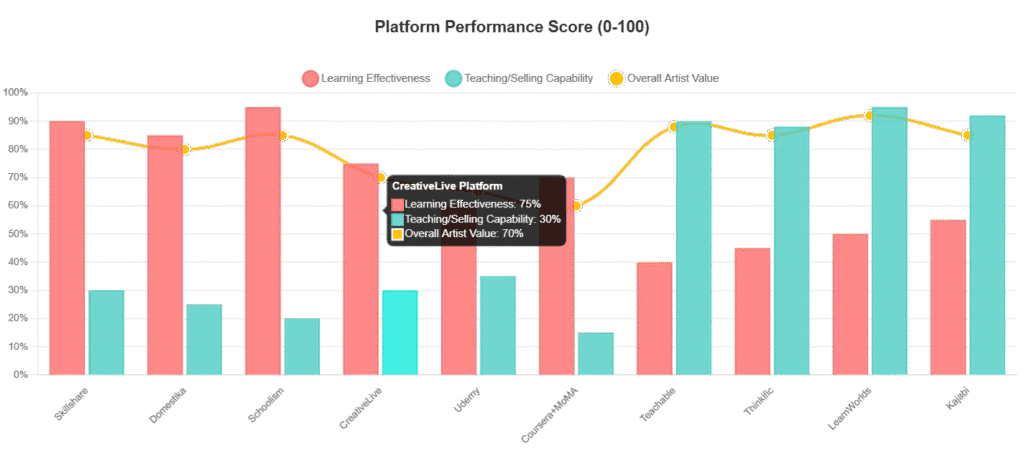
Learn vs. Sell
| Platform | Type | Best For | Pricing Style | Key Strengths for Artists | Watch-outs |
| Skillshare | Marketplace (learn) | Big creative catalog and fast projects | Subscription | 24k+ creative classes, project galleries, strong community | Quality varies; not deep mentorship |
| Domestika | Marketplace (learn) | Beautiful, focused, project classes | Per course / bundles | Stunning production, niche art topics, multilingual | Less feedback; some classes not in English |
| Schoolism | Online art school (learn) | Pro‑level concept art and illustration | Subscription or mentored | Industry teachers, deep lessons, tough assignments | Pricier; heavier workload |
| CreativeLive | Workshop marketplace (learn) | Photography, art business, mindset | Per class / bundles | Live workshop feel, Q&A, business topics | Not step‑by‑step fundamentals |
| Udemy | Marketplace (learn) | Cheap, targeted, one‑off skills | One‑time purchase | Huge choice, lifetime access, frequent sales | Quality varies a lot |
| Coursera + MoMA | University‑style (learn) | Art history, design theory, certificates | Free audit / paid cert | Academic depth, respected names, structured timelines | Less hands‑on art practice |
| Teachable | Course host (sell) | Simple setup and clean checkout | Monthly + fees | Easy course builder, downloads, coupons, affiliates | Limited native communities |
| Thinkific | Course host (sell) | Structured schools and bundles | Monthly | Solid student experience, simple communities | Fewer built‑in marketing tools |
| LearnWorlds | Course host (sell) | Interactive video and brand control | Monthly | Advanced video, assessments, design options | Steeper learning curve |
| Kajabi | All‑in‑one host (sell) | Courses + email + funnels | Monthly (higher) | Everything in one place | Most expensive |
Notes:
- Skillshare reports millions of students and a 24k+ creative catalog.
- Domestika lists thousands of creative courses across many languages.
- Schoolism is known for pro teachers and rigorous assignments.
Marketplace vs. Your Own School: Which Path Wins?
- Pick a marketplace if:
- You have no audience yet.
- You want discoverability and fast student feedback.
- You are okay with shared branding and royalty models.
- Pick a course host if:
- You have some followers or an email list.
- You want brand control, pricing control, and higher margins.
- You plan multiple courses, memberships, or bundles.
Many artists do both.
They start on a marketplace to learn teaching and build proof.
Then they launch a branded school for premium courses.
Platform Mini‑Reviews (Artist Focused)

Skillshare
- Best for: Illustrators, designers, digital artists, creative business starters
- What it is: A big creative subscription library with thousands of classes.
- Artist perks:
- Project‑based classes with galleries and student uploads.
- Short lessons fit studio breaks and busy days.
- Learning paths for tools like Procreate and Photoshop.
- Pricing: One subscription for unlimited classes. Free trial often offered.
- What students say:
- “Best value for artists. So many creative classes.”
- “I learned Procreate just from Skillshare classes. Projects kept me on track.”
- “Quality can be uneven. I follow top teachers only.”
- Best fit:
- You want quick wins and lots of creative topics.
- You like projects and peer feedback.
- Extra note: You can also teach on Skillshare and earn royalties.
Domestika
- Best for: Project lovers who want beautiful and focused classes
- What it is: A creative course site with high production and clear projects.
- Artist perks:
- Cinematic videos, tight structure, and tangible final projects.
- Wide range: illustration, craft, typography, 3D, and more.
- Many languages, with subtitles.
- Pricing: Per‑course purchases, frequent bundle deals.
- What students say:
- “The visuals are gorgeous. It feels like a studio film.”
- “Great niche topics. I built real portfolio pieces.”
- “Forums can be quiet. Less live feedback.”
- Best fit:
- You want a deep dive into a style or technique.
- You care about polish and step‑by‑step builds.
Schoolism
- Best for: Serious digital artists aiming at industry jobs
- What it is: A focused online art school taught by working pros.
- Artist perks:
- In‑depth lessons in concept art, character, and illustration.
- Mentored critique options at some tiers.
- Assignments that push real growth.
- Pricing: Subscription and mentored tiers. Pricier than marketplaces.
- What students say:
- “Closest to a real art school online.”
- “My portfolio leveled up. It was tough, but worth it.”
- “Not for dabblers. The workload is real.”
- Best fit:
- You want pro training, portfolio projects, and accountability.
CreativeLive
- Best for: Photography, creative business, and mindset
- What it is: Live and recorded workshops with Q&A feel.
- Artist perks:
- Great for pricing, marketing, freelance, and photo skills.
- Feels like a conference, not a short tutorial.
- Pricing: Per class or bundles; live broadcasts sometimes free.
- What students say:
- “I felt like I sat in a real workshop.”
- “Good for strategy and motivation. Less step‑by‑step basics.”
- Best fit:
- You want business savvy and long-form sessions.
Udemy
- Best for: Targeted, low-cost, one‑off skills
- What it is: Huge course marketplace with lifetime access per purchase.
- Artist perks:
- Cheap tool courses and art marketing classes.
- Frequent sales. Easy to build a library.
- Pricing: One‑time payment per course.
- What students say:
- “Great value for specific software or marketing tasks.”
- “Check reviews. Quality varies a lot.”
- Best fit:
- You want a few exact skills without a subscription.
Coursera + MoMA
- Best for: Art history and design theory with structure
- What it is: University‑style MOOCs with optional certificates.
- Artist perks:
- Learn modern art, design, and culture from trusted sources.
- Self‑paced. Free to audit many courses.
- Pricing: Free to audit; pay for certificates.
- What students say:
- “Helped my ideas. I think deeper about my art.”
- “Less drawing. More lectures and reading.”
- Best fit:
- You want context, story, and credibility for your art.
Teachable
- Best for: Independent artist teachers who want simple setup
- What it is: A clean, hosted platform to sell your own courses.
- Artist perks:
- Fast course builder, solid checkout, coupons, affiliates.
- Host files, brushes, downloads, and projects.
- Pricing: Monthly plans plus payment fees.
- What creators say:
- “I launched in a weekend. It just works.”
- “I wish it had deeper communities.”
- Best fit:
- You want to sell now with low tech stress.
Thinkific
- Best for: Structured schools, bundles, and simple communities
- What it is: A strong course host with solid student tools.
- Artist perks:
- Clear curriculum, good quizzes, certificates, and bundles.
- Community features for light student groups.
- Pricing: Monthly plans.
- What creators say:
- “Smooth student experience and easy lessons.”
- “Marketing tools are basic. I add my own stack.”
- Best fit:
- You want a polished school with room to grow.
LearnWorlds
- Best for: Interactive video, branding, and advanced design
- What it is: A premium course platform with strong learning tools.
- Artist perks:
- Interactive videos (notes, questions), transcripts, assessments.
- Lots of themes and white‑label options.
- Pricing: Monthly plans (mid‑to‑upper tier).
- What creators say:
- “My courses look high‑end. The tools are deep.”
- “It takes time to set everything up.”
- Best fit:
- You want engaging lessons and a custom brand feel.
Kajabi (Bonus)
- Best for: All‑in‑one business (courses, email, funnels, site)
- Artist perks:
- Run courses, newsletters, sales funnels, and pages in one place.
- Watch‑out:
- Most expensive of the group.
Real Student Feedback and Data (What We See Repeated)
What artists and reviewers say again and again:
- Skillshare:
- “It is the best value for creative folks.”
- Many learned Procreate or Illustrator start to finish here.
- Catalog is huge, but teacher quality varies. Follow top names.
- Domestika:
- “The visuals and projects are amazing.”
- Perfect for niche topics and portfolio pieces.
- Schoolism:
- “Closest to a real art school online.”
- Great for career goals, not casual dabbling.
- CreativeLive:
- “Feels like a live workshop.”
- Great for creative business and photography.
- Udemy:
- “Great value for specific tools.”
- Always check recent reviews and last update date.
- Coursera + MoMA:
- “Helped my thinking and context, not my brush control.”
Reported numbers that matter:
- Skillshare: millions of students and 24k+ creative classes in art fields.
- Domestika: thousands of courses, strong in Spanish and global markets.
- Schoolism: Industry pros teaching in‑depth courses and critiques.
These trends line up with blog roundups and platform claims.
Short version: use marketplaces for exposure; use hosts for control.
Choosing the Best Online Course Platform for Artists: Simple Paths
Pick your path by your situation:
- Beginner teacher, no audience:
- Start on Skillshare or Domestika for discoverability.
- Focus on a project people want to finish.
- Illustrator with 5k+ followers:
- Launch your course on Teachable or Thinkific.
- Sell one‑time and add a bundle later.
- Digital painter who wants interactive lessons:
- Use LearnWorlds for interactive video and assessments.
- Concept artist aiming for studio jobs:
- Study on Schoolism for deep skills and portfolio.
- Photographer who wants business basics:
- Take CreativeLive workshops on pricing and sales.
- Painter who wants art history for depth:
- Study Coursera + MoMA to boost your ideas and context.
- Creator who wants one platform for everything:
- Choose Kajabi for courses, email, and funnels.
Money Models: How You Get Paid
- Marketplaces:
- Skillshare: teacher royalties from member watch time.
- Domestika/Udemy/CreativeLive: per‑course sales, often during sales.
- You trade control for traffic and less setup.
- Course hosts:
- Teachable/Thinkific/LearnWorlds/Kajabi: you set prices.
- Sell one‑time, subscriptions, bundles, memberships, workshops.
- Higher margins, but you do marketing.
Tip: Start with a signature course. Add a cheaper workshop and a membership later.
Must‑Have Creative Features (Checklist)
Make sure your platform supports:
- High‑quality video (1080p or better) and fast streaming
- Large image files, PDFs, brushes, textures, project files
- Project galleries so students can post work
- Comments, communities, or critiques
- Coupons, bundles, affiliates, and email integrations
- Mobile‑friendly player and captions for accessibility
- Multiple currencies and global payments
Skillshare and Domestika are strong on projects.
Teachable and Thinkific are strong on sales and lessons.
LearnWorlds is strong on interactive learning and design.
Example Course Paths (Artist Scenarios)
- Watercolor painter:
- Start with a Domestika course to learn filming and structuring.
- Teach your own beginner watercolor on Teachable.
- Offer a brush pack and textures as bonuses.
- Procreate illustrator:
- Take Skillshare classes to sharpen workflow.
- Launch a Procreate character design course on Thinkific.
- Build a small community for student feedback.
- Concept artist:
- Study Schoolism for portfolio and feedback.
- Teach your own creature design workshop on LearnWorlds.
Quick Start Plan: Launch Your First Art Course
- Define your one promise
- Example: “Paint a glowing moonlit scene in Procreate.”
- Outline 5–8 short modules
- Each with clear steps and a project task.
- Record short videos (6–10 minutes each)
- Use screen capture or a simple top‑down camera.
- Add downloads
- Brushes, palettes, reference, and checklists.
- Price and publish
- Marketplaces: follow their guides and topic trends.
- Hosts: set one‑time price, add early‑bird coupons.
- Promote with three simple moves
- Post process clips on Instagram/TikTok/YouTube.
- Email a 3‑part launch sequence.
- Offer a live Q&A or bonus lesson for week one.
- Collect projects and testimonials
- Highlight wins. Improve lessons from questions.
Artist FAQs
- Do I need a big following to make money?
- No. Marketplaces can bring early traffic.
- A small, loyal audience can also buy direct.
- Which platforms promote my classes for me?
- Skillshare, Domestika, Udemy, CreativeLive promote within their sites.
- Teachable, Thinkific, LearnWorlds, Kajabi do not. You do the marketing.
- Can I sell brushes, presets, or downloads?
- Yes on hosts. Some marketplaces allow downloads inside courses.
- Can I move later if I outgrow a platform?
- Yes. You can re-film or re-upload and redirect students.
- What is the most affordable way to start?
- Udemy for learning cheap skills.
- Skillshare for wide creative learning under one subscription.
- Teachable/Thinkific entry plans for selling your first course.
- Live classes or recorded?
- Start recorded for evergreen sales.
- Add live workshops for community and upsells.
Case Notes and Patterns (What Works for Artists)
- Short, project‑based classes perform well on Skillshare and Domestika.
- Clear before/after results help sales pages on Teachable and Thinkific.
- Bundles (e.g., beginner + advanced) increase average order value.
- Bonuses matter: brushes, textures, PSD files, reference packs.
- Student galleries boost trust. Show real student work.
- Reviews show that consistent updates and clear audio matter more than fancy gear.
Quick Picks by Need
- Best for beginners with no audience: Skillshare or Domestika
- Best overall for selling your own course: Teachable
- Best for structured schools and bundles: Thinkific
- Best for interactive learning and design control: LearnWorlds
- Best for pro‑level art training: Schoolism
- Best for creative business workshops: CreativeLive
- Best budget one‑off skills: Udemy
- Best for art history and theory: Coursera + MoMA
- Best all‑in‑one business suite: Kajabi
Conclusion: Your Next Three Steps
- Pick your path: Marketplace for exposure, or Host for control.
- Choose your platform: Use the Quick Picks list above.
- Build and launch a project‑based course with clear downloads and bonuses.
Start small. Teach one great project. Grow with each class.